Retrieving Windows 8 theme colours

See also: Windows 8 Theme Colours Reference.

Windows 8 doesn’t offer developers access to system theme colours, unlike its cousin, Windows Phone. Even for a version 1 product, this seems like a strange omission. Then again, we still don’t have a working public API for retrieving the Aero glass colour (or whatever we call it now that Aero’s gone) 6 years after the release of Windows Vista.

The functions that the system uses to retrieve colours are defined in UxTheme.dll. In particular, we’re interested in GetImmersiveColorSetCount (export #94), GetImmersiveColorFromColorSetEx (export #95), GetImmersiveColorTypeFromName (export #96), GetImmersiveUserColorSetPreference (export #98) and GetImmersiveColorNamedTypeByIndex (export #100). Relying on undocumented functions is a bad idea, and will cause your program to fail certification, so you won’t be able to use them in apps distributed through the Windows Store anyway.

For desktop developers who still want to use these functions, read on. Just assume that they’ll break in future versions of Windows (or even with patches to Windows 8).

Screenshot of Windows 8 Colours
Continue reading “Retrieving Windows 8 theme colours”

FastPictureViewer Codec Pack, Windows 8 and WPF don’t play nicely together

Update (2012-09-06): After some trial and error, it seems the Canon Hack Development Kit (CHDK) component is causing the issue. If you’re experiencing the same problem, try removing this component.

Update (2012-09-05): The FastPictureViewer support team was unable to reproduce the issue, but suggested it might have something to do with the JPEG Auto-Rotate feature. I was able to resolve the issue by installing only the following components of the codec pack: Photoshop PSD, Lightroom Previews, Adobe DNG, Canon CR2, CRW, PDF Thumbnails and Control Panel. This suggests one of the other components was causing the conflict on my machines.

I use the FastPictureViewer Codec Pack for viewing DNG images in Windows Explorer, amongst other things. Unfortunately, however, installing version 3.3.0.69 of the codec pack in Windows 8 (64-bit) caused my installations of Visual Studio 2010, Visual Studio 2012, Blend 4 and Blend for Visual Studio 2012 to stop working to various extents. Both versions of Blend crash silently. The start pages in both versions of Visual Studio fail to load, with VS2010 displaying a Content Load Error relating to System.Windows.Baml2006.TypeConverterMarkupExtension throwing an exception. The error message displayed where the Visual Studio 2012 Solution Explorer belongs was more useful: System.Runtime.InteropServices.COMException: The codec is in the wrong state. (Exception from HRESULT: 0x88982F04).

Continue reading “FastPictureViewer Codec Pack, Windows 8 and WPF don’t play nicely together”

Office 2013: Further evidence of the demise of ClearType?

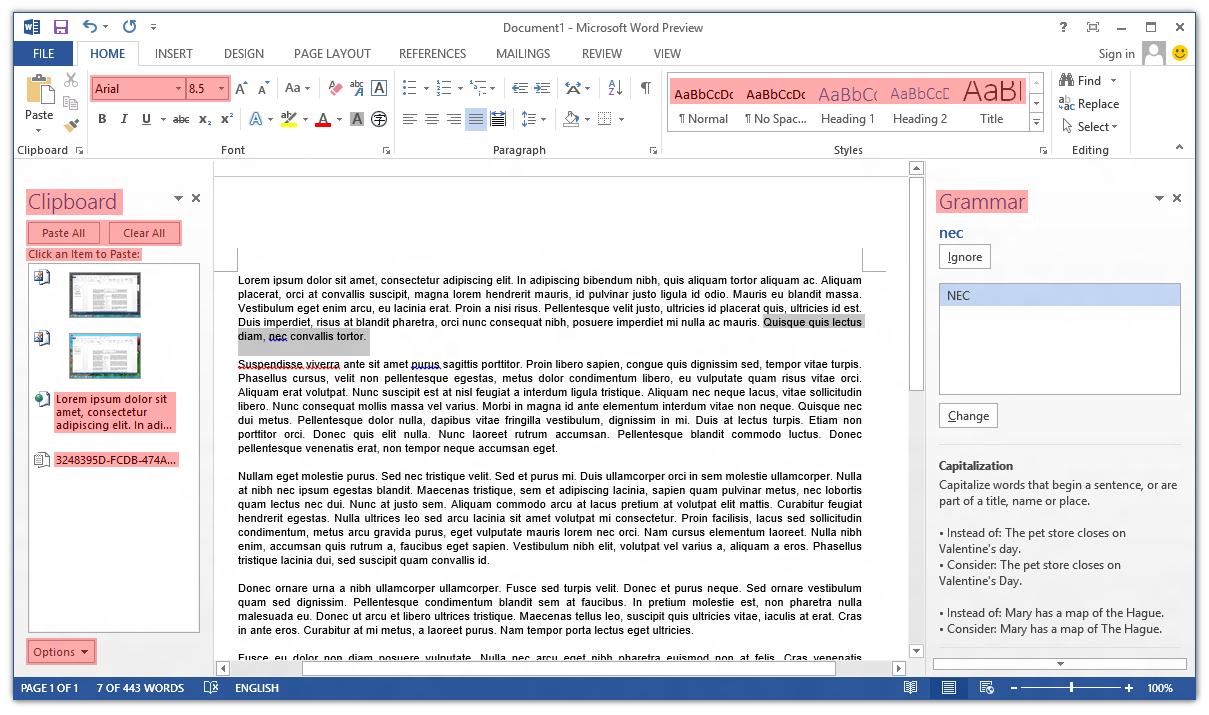
Poking around the Office 2013 Customer Preview, one thing that caught my eye immediately was the lack of ClearType font smoothing. Nearly all user interface elements use ‘greyscale’ font smoothing (as opposed to ClearType’s sub-pixel smoothing). I’ve highlighted the parts of Word 2013 that still use ClearType:

Screenshot of ClearType in Microsoft Word 2013

The text in cells in Excel 2013 still respects the system’s ClearType setting, and Outlook 2013 is a real mess (about half-and-half). OneNote 2013 seems to have retained ClearType in most places (outside the ribbon control).

Continue reading “Office 2013: Further evidence of the demise of ClearType?”

WPF: Using system colours in animations

WPF provides access to the Windows system colours through the System.Windows.SystemColors class. As the MSDN documentation indicates, it’s possible to bind to these colours dynamically using the *Key resources, so when the system colours change, so will the appearance of your application.

Continue reading “WPF: Using system colours in animations”

More on Segoe UI in Windows 8

Note: the following is based on the Windows 8 Release Preview (build 8400) and may not accurately reflect the final version of Windows 8. I’ll update this post if there are changes in future builds.

Updated: The fonts have been updated in the public beta (Windows Consumer Preview) and release candidate (Windows Release Preview) and I’ve changed the tables below to reflect this. I was also made aware of some additional information about changes to Segoe UI, including new stylistic sets and support for ligatures: you can read more at Subacme.

Further to my earlier post about Segoe UI Light in Windows 8, I’ve done some more research into the changes to the Segoe family of fonts. The Fonts class in the .NET Framework was helpful for retrieving information about the fonts.

Continue reading “More on Segoe UI in Windows 8”

Segoe UI Light improvements in Windows 8

Windows 7 comes with Segoe UI Light version 5.00/0.90. Windows 8 (as of the Windows Consumer Preview) comes with version 5.15, which has been hinted at various sizes. This comes as a very welcome change, especially with Microsoft using Segoe UI Light all over the place in its latest webpage designs. I recommend grabbing the updated versions of Segoe UI from Windows 8 for your Windows 7 or Windows Vista machines.

Continue reading “Segoe UI Light improvements in Windows 8”

When should a program’s UI animations be disabled?

Modern frameworks like the Windows Presentation Foundation, its relative Silverlight and the upcoming Windows Runtime make it easy to add animations to a program’s graphical user interface. When implemented well, animations subtly improve the user experience and can demonstrate a high level of polish in your application. The Zune client software and Windows Live Messenger both feature beautiful animations – coincidentally, both were written with internal Microsoft frameworks (Iris and ‘DirectUI’, respectively; the second is apparently unrelated to anything in WinRT). The Twitter client MetroTwit shows what can be done in WPF (its interface was inspired by the Zune software and the Metro design language).

There are times, however, when animations may become detrimental to the user experience. Animations may appear choppy on lower-end or older systems (especially with heavy frameworks like WPF), and in general they should be disabled entirely for Remote Desktop Connection sessions (only very fast networks with low latency may be able to handle them). Jossef Goldberg from the Visual Studio team has written about the efforts made to bring the performance of Visual Studio 2010 over remote connections up to par, and while his advice is mainly about WPF, the same principles apply to other frameworks, also.

So, how can we decide whether animations should be disabled? The answer will likely vary from project to project, but there are a few things that we can do:

Continue reading “When should a program’s UI animations be disabled?”

Theming & visual styles in Windows 8

The following is based on the Windows Developer Preview and might not accurately represent the final version of Windows 8.

A significant change in Windows 8 is the removal of support for Windows classic theming. In the Windows Developer Preview, there is no Windows Classic theme, and all themes (including Windows Basic and the four high contrast themes) use the Desktop Window Manager (DWM) for desktop composition (in Windows Vista and Windows 7, it was only enabled for Aero themes).

Continue reading “Theming & visual styles in Windows 8”