As I noted in my earlier post, the method for selecting theme (‘accent’) colours in Windows ‘Blue’ build 9364 has changed from Windows 8 RTM. I’m not going to bother looking too closely at the updates to the functions in UxTheme.dll this early in the development process, but I did notice two new registry values in the key HKCU\Software\Microsoft\Windows\CurrentVersion\Explorer\Accent: AccentColor and StartColor. These are DWORD values that store the accent colour and background colour, respectively. The format is 0xAABBGGRR. The old ColorSet_Version3 value from Windows 8 is gone for obvious reasons. AccentId_v8.00 from Windows 8 is now MotionAccentId_v1.00, but it seems to serve the same purpose – indicating which background image is selected.
Tag: metro
Retrieving Windows 8 theme colours
See also: Windows 8 Theme Colours Reference.
Windows 8 doesn’t offer developers access to system theme colours, unlike its cousin, Windows Phone. Even for a version 1 product, this seems like a strange omission. Then again, we still don’t have a working public API for retrieving the Aero glass colour (or whatever we call it now that Aero’s gone) 6 years after the release of Windows Vista.
The functions that the system uses to retrieve colours are defined in UxTheme.dll. In particular, we’re interested in GetImmersiveColorSetCount (export #94), GetImmersiveColorFromColorSetEx (export #95), GetImmersiveColorTypeFromName (export #96), GetImmersiveUserColorSetPreference (export #98) and GetImmersiveColorNamedTypeByIndex (export #100). Relying on undocumented functions is a bad idea, and will cause your program to fail certification, so you won’t be able to use them in apps distributed through the Windows Store anyway.
For desktop developers who still want to use these functions, read on. Just assume that they’ll break in future versions of Windows (or even with patches to Windows 8).

Windows 8: Bypassing the Start screen
After using the Windows Developer Preview (that is, Windows 8 pre-beta) build for a little while, I’m not at all sold on the Start screen as a replacement for the Start menu for keyboard-and-mouse users. I’m not giving up all hope yet, though – I wasn’t overly fond of the Backstage view when I first tried early builds of Office 2010, which similarly replaced what was a simple menu in Office 2007 with a full screen experience, but I’ve since grown to like it. And, of course, development is far from over at this stage.
Continue reading “Windows 8: Bypassing the Start screen”Office 15: per-application border colours?
Winreview.ru’s latest Office 15 screenshots reveal application-specific border colours and drop-shadows. Word gets a dark blue border and shadow, Excel gets a green border and shadow, etc.:
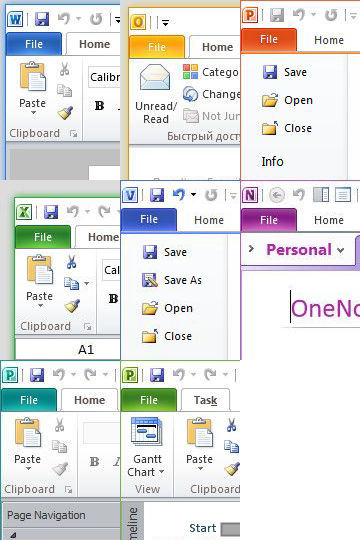
Microsoft in fact applied for a patent for per-window glass colourisation in late 2005 (‘Glass appearance window frame colorization’; discovered by Long Zheng in 2007). While there isn’t any glass in the Office 15 windows shown here (despite the DWM being enabled), the idea is similar.
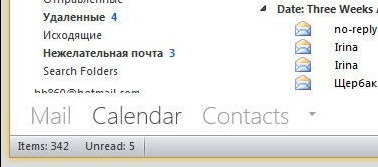
Office 15 and Windows 8 seem to be moving in similar UI directions – it seems like square corners are in and transparency is out (at least for the ‘Aero Lite’ theme).