What's up with Office 2013's context menu and tooltip shadows?

Update (2015-04-22): Somewhat surprisingly, a recent Office 2013 patch appears to have fixed this issue.

Update (2015-03-04): Office 2016 fixes this.

Update (2014-10-03): Office 2013 running on the Windows 10 Technical Preview (build 9841) exhibits the same issue 🙁

At some point in the not-too-distant past, Office 2013 started rendering strange shadow artefacts in the four corners of all context menus and tooltips:
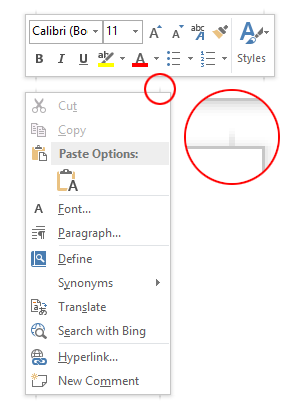
Screenshot of Word 2013 Context Menu Shadow Artefacts

This didn’t always happen, as a quick search for ‘Word 2013 screenshots’ will reveal lots of images of glitch-free floating windows. I’m too lazy to check, but I’ll hazard a guess that this started happening with Windows 8.1 or Windows 8.1 Update 1.

Being Office, they’ve re-implemented every GUI element themselves instead of letting the OS handle them. One can sympathise with this approach, but it’s important to get the little details right. A bit like how the IE team should finally spend the time to get their scrollbars right. Of course, it’s folly to ever expect UI consistency on Windows when even Microsoft can’t get it right.

A man can dream, though. A man can dream.

Enabling the compatibility property sheet for (almost) all programs in Windows 8/8.1

Windows 8 and 8.1 hide the compatibility property sheet for certain programs (namely programs included with Windows, like Notepad, and those on a whitelist of programs known to run correctly on Windows 8/8.1 – defined in %WinDir%\apppatch\pcamain.sdb). In some cases, one can still run the ‘troubleshoot compatibility’ wizard by right-clicking on the file, which just presents compatibility settings in a novice-friendly, poweruser-unfriendly way.

The compatibility property sheet and context menu are defined in acppage.dll. By patching this DLL, we can enable the compatibility property sheet for (almost) all programs, including programs like Notepad and those whitelisted in pcamain.sdb.

Patching Windows system DLL files is probably a bad idea, and I take no responsibility if your computer explodes after you take the following steps.

Continue reading “Enabling the compatibility property sheet for (almost) all programs in Windows 8/8.1”

Windows 8.1 impressions

Windows 8.1 is done, though Microsoft is apparently worried enough about driver and application support that not even loyal MSDN and TechNet subscribers will get it until October 17 this year. To no-one’s surprise, the RTM ISOs were promptly leaked, which leaves us in the odd situation where the only way to test your programs against the latest version of Windows is to download disc images from shady websites.

My impressions of Windows 8.1 don’t differ much from what I wrote earlier this year when it was still ‘Windows Blue’: no-one who hates Windows 8 is going to be swayed by Windows 8.1, but if you love Windows 8, you’ll probably love Windows 8.1.

Continue reading “Windows 8.1 impressions”