Facebook Messenger for Windows is not just for Windows 7

Facebook recently launched ‘Messenger for Windows’, a desktop client for Facebook chat.

The Messenger for Windows help page suggests that the program requires Windows 7:

What kind of computer operating system do I need in order to use Messenger for Windows?
You can set up the app if you use Windows 7 on your computer.

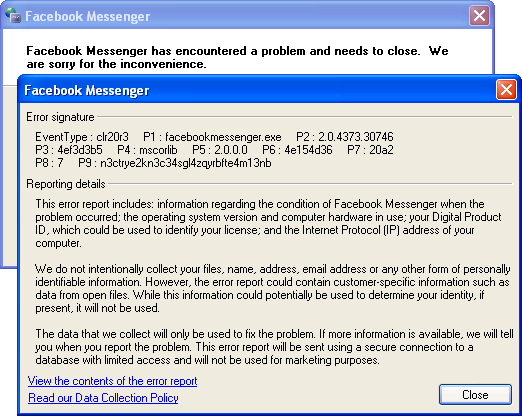
In fact, it runs perfectly well under Windows Vista with the .NET Framework installed. In Windows XP, it crashes on load (though the notification area icon appears first):

Screenshot of Facebook Messenger for Windows (XP)
Continue reading “Facebook Messenger for Windows is not just for Windows 7”

When should a program’s UI animations be disabled?

Modern frameworks like the Windows Presentation Foundation, its relative Silverlight and the upcoming Windows Runtime make it easy to add animations to a program’s graphical user interface. When implemented well, animations subtly improve the user experience and can demonstrate a high level of polish in your application. The Zune client software and Windows Live Messenger both feature beautiful animations – coincidentally, both were written with internal Microsoft frameworks (Iris and ‘DirectUI’, respectively; the second is apparently unrelated to anything in WinRT). The Twitter client MetroTwit shows what can be done in WPF (its interface was inspired by the Zune software and the Metro design language).

There are times, however, when animations may become detrimental to the user experience. Animations may appear choppy on lower-end or older systems (especially with heavy frameworks like WPF), and in general they should be disabled entirely for Remote Desktop Connection sessions (only very fast networks with low latency may be able to handle them). Jossef Goldberg from the Visual Studio team has written about the efforts made to bring the performance of Visual Studio 2010 over remote connections up to par, and while his advice is mainly about WPF, the same principles apply to other frameworks, also.

So, how can we decide whether animations should be disabled? The answer will likely vary from project to project, but there are a few things that we can do:

Continue reading “When should a program’s UI animations be disabled?”
Theming & visual styles in Windows 8

The following is based on the Windows Developer Preview and might not accurately represent the final version of Windows 8.

A significant change in Windows 8 is the removal of support for Windows classic theming. In the Windows Developer Preview, there is no Windows Classic theme, and all themes (including Windows Basic and the four high contrast themes) use the Desktop Window Manager (DWM) for desktop composition (in Windows Vista and Windows 7, it was only enabled for Aero themes).

Continue reading “Theming & visual styles in Windows 8”

Windows theme fonts redux & sample code

View source on GitHub.

In a post earlier this year, I investigated how to retrieve information about theme fonts in Windows. Briefly, the Visual Styles APIs can be used when visual styles are enabled, but values need to be hard-coded (to some extent) otherwise.

Andrew Powell commented on my previous post noting difficulties in implementing the GetThemeFont function in managed code. In this post, I’ll demonstrate how to implement the relevant functions in a simple WPF project. In particular, I’ll focus on displaying information about the ‘main instruction’ text style as seen in Task Dialogs.

Read on for details.

Continue reading “Windows theme fonts redux & sample code”

Installing CUSP (Eclipse Lisp plugin)

Update (2011-09-28): My own instructions didn’t work when I tried to install Eclipse and CUSP on a new machine. After much trial and error, I finally got a working setup by downloading a newer version of CUSP from here (version 1.0.414). This seems to work with SBCL 1.0.51 and Eclipse 3.7 (I downloaded the Classic package, in case that is significant). There no longer seems to be any need to copy the SBCL files to the plugin sub-directory. The CUSP maintainer has forked CUSP into a new project called Lispdev, which might be worth checking out.

For anyone struggling to install CUSP (a Lisp plugin for Eclipse) in a Windows environment, I hope these steps will work for you:

Continue reading “Installing CUSP (Eclipse Lisp plugin)”

Windows theme fonts

View source on GitHub.

Update: See this post for a sample implementation in WPF.

Screenshot of Task Dialog (Aero)

Have you ever wondered how to access the various font colours and styles found throughout Windows, such as that of the ‘Main Instruction’ text in the Task Dialog shown above?

Continue reading “Windows theme fonts”

WM_DWMCOLORIZATIONCOLORCHANGED doesn’t give the Aero Glass base colour

From MSDN:

WM_DWMCOLORIZATIONCOLORCHANGED Message

Sent to all top-level windows when the colorization color has changed.

Parameters
wParam: Specifies the new colorization color. The color format is 0xAARRGGBB.
lParam: Specifies whether the new color is blended with opacity.

We receive this message when the Aero Glass colour changes. Unfortunately, the value contained in wParam is not the ‘base colour’, as it is in fact the result of the DwmGetColorizationColor function. As Rafael Rivera noted last year, when glass transparency is enabled, the value returned by this function is quite different to the base colour:

Continue reading “WM_DWMCOLORIZATIONCOLORCHANGED doesn’t give the Aero Glass base colour”

SetDPI utility

View source on GitHub.

Updated 2013-01-06.

Ken Silverman’s PNG compression tool PNGOUT (complemented nicely by the free .NET frontend PNGGauntlet) can be remarkably effective at trimming the size of PNGs without altering the image described within.

However, in its quest to remove anything non-essential, PNGOUT by default strips out the image’s DPI (in fact PPI) information. PNGs without PPI information will be treated differently by different software.

Continue reading “SetDPI utility”

Pixel measurements in WPF

Part of the beauty of the Windows Presentation Foundation is that it is designed to be resolution independent – that is, a WPF application should scale perfectly no matter the system’s DPI setting (excluding any bitmap graphics, which mightn’t look as nice as the vector parts).

Continue reading “Pixel measurements in WPF”