I’ve belatedly updated my Windows System Colours Reference and post about Segoe UI to reflect changes in the Windows 8 Release Preview.
Tag: windows 8
More on Segoe UI in Windows 8
Note: the following is based on the Windows 8 Release Preview (build 8400) and may not accurately reflect the final version of Windows 8. I’ll update this post if there are changes in future builds.
Updated: The fonts have been updated in the public beta (Windows Consumer Preview) and release candidate (Windows Release Preview) and I’ve changed the tables below to reflect this. I was also made aware of some additional information about changes to Segoe UI, including new stylistic sets and support for ligatures: you can read more at Subacme.
Further to my earlier post about Segoe UI Light in Windows 8, I’ve done some more research into the changes to the Segoe family of fonts. The Fonts class in the .NET Framework was helpful for retrieving information about the fonts.
Continue reading “More on Segoe UI in Windows 8”Segoe UI Light improvements in Windows 8
Windows 7 comes with Segoe UI Light version 5.00/0.90. Windows 8 (as of the Windows Consumer Preview) comes with version 5.15, which has been hinted at various sizes. This comes as a very welcome change, especially with Microsoft using Segoe UI Light all over the place in its latest webpage designs. I recommend grabbing the updated versions of Segoe UI from Windows 8 for your Windows 7 or Windows Vista machines.
Continue reading “Segoe UI Light improvements in Windows 8”Theming & visual styles in Windows 8
The following is based on the Windows Developer Preview and might not accurately represent the final version of Windows 8.
A significant change in Windows 8 is the removal of support for Windows classic theming. In the Windows Developer Preview, there is no Windows Classic theme, and all themes (including Windows Basic and the four high contrast themes) use the Desktop Window Manager (DWM) for desktop composition (in Windows Vista and Windows 7, it was only enabled for Aero themes).
Continue reading “Theming & visual styles in Windows 8”Windows 8: Bypassing the Start screen
After using the Windows Developer Preview (that is, Windows 8 pre-beta) build for a little while, I’m not at all sold on the Start screen as a replacement for the Start menu for keyboard-and-mouse users. I’m not giving up all hope yet, though – I wasn’t overly fond of the Backstage view when I first tried early builds of Office 2010, which similarly replaced what was a simple menu in Office 2007 with a full screen experience, but I’ve since grown to like it. And, of course, development is far from over at this stage.
Continue reading “Windows 8: Bypassing the Start screen”Office 15: per-application border colours?
Winreview.ru’s latest Office 15 screenshots reveal application-specific border colours and drop-shadows. Word gets a dark blue border and shadow, Excel gets a green border and shadow, etc.:
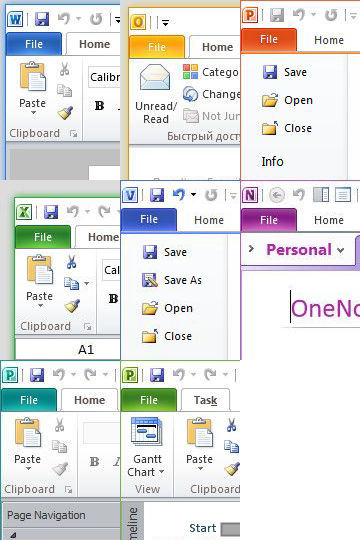
Microsoft in fact applied for a patent for per-window glass colourisation in late 2005 (‘Glass appearance window frame colorization’; discovered by Long Zheng in 2007). While there isn’t any glass in the Office 15 windows shown here (despite the DWM being enabled), the idea is similar.
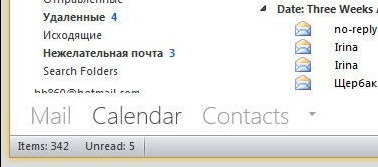
Office 15 and Windows 8 seem to be moving in similar UI directions – it seems like square corners are in and transparency is out (at least for the ‘Aero Lite’ theme).
Early Windows 8 UI changes
Some early screenshots of Windows 8 have leaked recently, providing some clues as to what changes we might see in the user interface.
Continue reading “Early Windows 8 UI changes”