Changing the Synaptics ‘ChiralScroll’ cursor

The Synaptics Gesture Suite enables a variety of useful features for supported laptop touchpads. My favourite is ‘ChiralScroll’, which allows you to scroll by making a circular motion on the touchpad. Synaptics actually offers generic drivers on their website now, so you can download them directly without needing to go via the usual websites.

Unfortunately, the cursor used for ChiralScroll leaves a lot to be desired:

Default ChiralScroll Cursor

At the very minimum, it doesn’t mesh well with the cursors found in the Windows Aero theme. I decided this would be a better cursor:

New ChiralScroll Cursor

I’m misappropriating the ‘Move’ cursor here (a separate metaphor), but I think the image fits with scrolling to some extent. Let me know if you can come up with a better alternative.

Read on for instructions on replacing the cursor.

Continue reading “Changing the Synaptics ‘ChiralScroll’ cursor”
Windows theme fonts

View source on GitHub.

Update: See this post for a sample implementation in WPF.

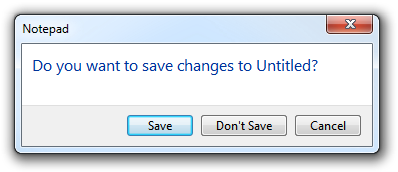
Screenshot of Task Dialog (Aero)

Have you ever wondered how to access the various font colours and styles found throughout Windows, such as that of the ‘Main Instruction’ text in the Task Dialog shown above?

Continue reading “Windows theme fonts”

WM_DWMCOLORIZATIONCOLORCHANGED doesn’t give the Aero Glass base colour

From MSDN:

WM_DWMCOLORIZATIONCOLORCHANGED Message

Sent to all top-level windows when the colorization color has changed.

Parameters
wParam: Specifies the new colorization color. The color format is 0xAARRGGBB.
lParam: Specifies whether the new color is blended with opacity.

We receive this message when the Aero Glass colour changes. Unfortunately, the value contained in wParam is not the ‘base colour’, as it is in fact the result of the DwmGetColorizationColor function. As Rafael Rivera noted last year, when glass transparency is enabled, the value returned by this function is quite different to the base colour:

Continue reading “WM_DWMCOLORIZATIONCOLORCHANGED doesn’t give the Aero Glass base colour”

Office 15: per-application border colours?

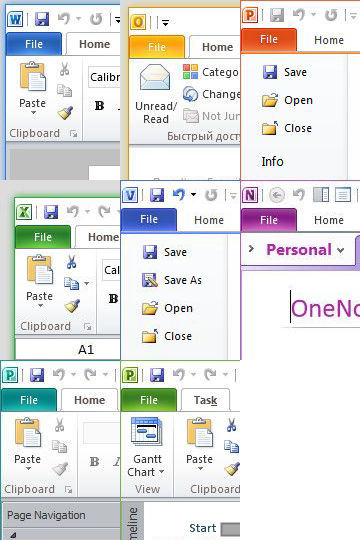
Winreview.ru’s latest Office 15 screenshots reveal application-specific border colours and drop-shadows. Word gets a dark blue border and shadow, Excel gets a green border and shadow, etc.:

Office 15.0.2703.1000 Borders

Microsoft in fact applied for a patent for per-window glass colourisation in late 2005 (‘Glass appearance window frame colorization’; discovered by Long Zheng in 2007). While there isn’t any glass in the Office 15 windows shown here (despite the DWM being enabled), the idea is similar.

Outlook 15

Office 15 and Windows 8 seem to be moving in similar UI directions – it seems like square corners are in and transparency is out (at least for the ‘Aero Lite’ theme).

SetDPI utility

View source on GitHub.

Updated 2013-01-06.

Ken Silverman’s PNG compression tool PNGOUT (complemented nicely by the free .NET frontend PNGGauntlet) can be remarkably effective at trimming the size of PNGs without altering the image described within.

However, in its quest to remove anything non-essential, PNGOUT by default strips out the image’s DPI (in fact PPI) information. PNGs without PPI information will be treated differently by different software.

Continue reading “SetDPI utility”

Default password for ‘myLGNet’ wireless networks

If ever you stumble across a wireless network with the name myLGNet and have need to access it, the default password is 123456789a.

Of course, if the network uses only WEP for protection, it shouldn’t be hard to gain access even without that knowledge.

Adventures in password security: AirAsia

When I created a user account at AirAsia’s website a little while ago, I was surprised to be told to choose a password with a minimum length of 16 characters*. I suspect that the average user’s password doesn’t approach that length (perhaps it would be better if it did). In any case, I duly typed in my combination of letters and numbers and went about my business, happy to believe that such an onerous requirement said something about AirAsia’s commitment to security.

A month down the track, I went back to the website only to find I’d forgotten which password I had chosen – for whatever reason, my browser had not saved my credentials. After a few guesses, I gave up and clicked the ‘forgot password’ link (making sure nobody was looking; I must not be the only one embarrassed to have to have to rely on that feature). I typed in my email address and received a message shortly afterwards.

Lo and behold, there was my 17-character password in plain text, staring right at me.

Oh, well – if someone happens to steal their database, at least it won’t be any of my usual passwords that they find – those are shorter than 16 characters 🙂

(*I see that the requirement is now for only 8 characters.)

Pixel measurements in WPF

Part of the beauty of the Windows Presentation Foundation is that it is designed to be resolution independent – that is, a WPF application should scale perfectly no matter the system’s DPI setting (excluding any bitmap graphics, which mightn’t look as nice as the vector parts).

Continue reading “Pixel measurements in WPF”

Small icon size & DPI in Windows

The GetSystemMetrics function in Windows retrieves system metrics and configuration settings. One such metric is the recommended size (width and height) of ‘small icons’:

Small icons typically appear in window captions and in small icon view.

Another place where small icons show up is the notification area.

MSDN contains a guide to Creating DPI-Aware Applications. It notes the challenge posed by raster graphics and different DPIs. Unlike vector graphics, which can scale without a loss in quality, distinct raster images must be created for different resolutions in order to avoid unpleasant scaling artefacts. (In fact, this is perhaps overstating the benefits of vector graphics: the level of detail suitable for a high-resolution image is not necessarily suitable for a low-resolution image, so using the same vector for all sizes doesn’t always make sense.) Windows icons, as of Windows 7, contain only raster graphics.

Continue reading “Small icon size & DPI in Windows”